How to Create a WhatsApp Wedding Invitation
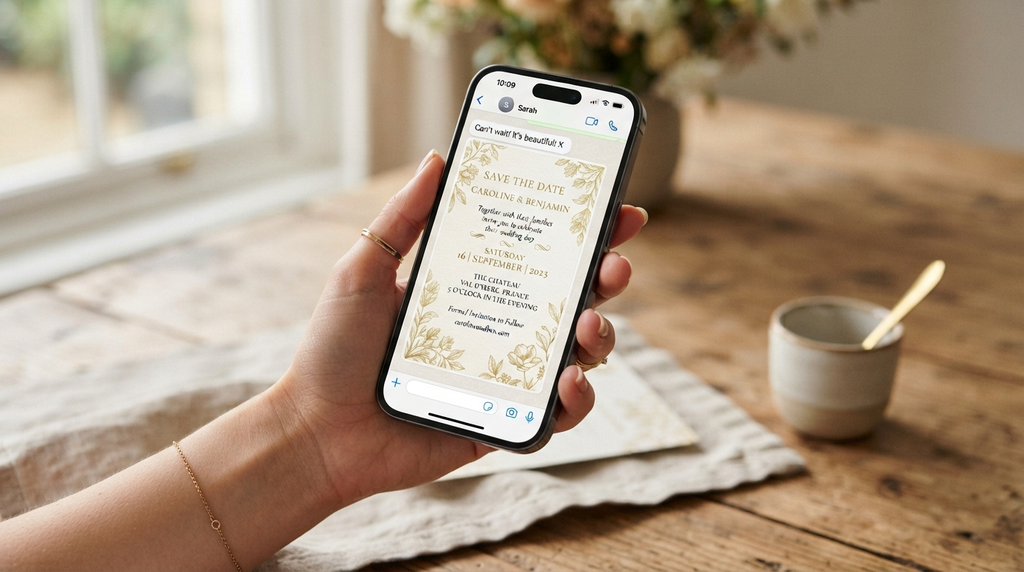
Design a vertical 1080×1920 card in Canva (free), export it as an image or a 20–30 second video, and send it through a Broadcast List — not a group — so every guest receives it as a private message and nobody’s phone number is exposed to strangers. Link a Google Form for RSVPs, send 6–8 weeks before the wedding, and run day-of logistics in a dedicated group people opt into. Total cost: zero. The two rules that matter most: broadcast protects privacy, and the card plus a tappable link outperforms any single format.
At a Glance
| Step | Tool | Time |
|---|---|---|
| Design the card | Canva (free) | 1–2 hours |
| Draft the message text | Templates below | 20 min |
| Send via broadcast list | WhatsApp (256-contact cap) | 30 min |
| Collect RSVPs | Google Forms → Sheet | 30 min |
| Day-of logistics | Opt-in group + pinned message | 10 min |
How We Structured This Guide
- Platform accuracy. Steps follow WhatsApp’s published behavior: the 256-contact broadcast cap, the saved-number requirement for delivery, and document-send compression behavior per the WhatsApp Help Center.
- Etiquette-first ordering. Privacy (broadcast vs. group) is treated as step one, because it’s the mistake that can’t be undone.
- Dual-track reality. Print-and-mail remains the default for older relatives; the guide builds that in rather than pretending everyone’s on WhatsApp.
Why WhatsApp Invitations Work (And Where They Fall Short)
WhatsApp is the default messaging platform across the UK, Europe, India, Latin America, Africa, and much of Asia — for guest lists spanning those regions it beats email on open rates alone: messages land in the app people actually check, with photos intact and no spam folder to fight. Delivery is instant, corrections are immediate (a venue change reaches everyone in one send), and the whole system costs nothing.
The honest limitations: it lacks the keepsake quality of print, offers no native RSVP tracking (hence the form), and delivers broadcast messages only to contacts who have YOUR number saved — a real constraint with consequences covered below. And in the US, where iMessage and SMS still dominate domestically, WhatsApp shines mainly for international guest lists. The strongest version of the system uses WhatsApp as the spine and print for the inner circle — which is exactly how this guide builds it.
#1. Design the Invitation Card in Canva
A portrait 1080×1920 card from Canva’s invitation templates, customized with your details and exported for WhatsApp.
Why It Works
Canva’s free tier includes hundreds of wedding invitation templates at exactly this canvas size, and a vertical image fills a phone screen edge-to-edge in chat — the closest digital equivalent to handing someone a printed card. The design skills required are zero; the taste required is choosing one template and changing only the words.
How to Do It
- Search Canva templates for “WhatsApp wedding invitation” or “story invitation” (1080×1920).
- Replace names, date, time, venue, dress code, and RSVP deadline.
- Keep contrast high and fonts thick — WhatsApp compresses images, and fine hairlines get muddy.
- Export: PNG for the image card; MP4 1080p for a video invite (photos + details + music).
- Send the file to YOURSELF first and inspect it on your phone at real chat size.
The Compression Reality
WhatsApp recompresses images and videos to keep chats fast. Two consequences: delicate design details (thin scripts, dense patterns) blur, and colors shift slightly darker. Design bold and test actual — the self-send step exists because the desktop preview lies. For video quality that matters, send the file as a document rather than a video: documents bypass the heavier compression (per WhatsApp Help Center behavior), at the cost of the inline preview thumbnail.
Strengths
- Free, professional results without a designer
- Video option feels premium at the same effort level
- Re-exportable for every correction
Trade-Offs
- Compression softens detail — design bold, not delicate
- RSVP links inside images aren’t tappable; they live in the message text
Best For
Every couple — this is the standard method.
#2. Send via Broadcast List (The Privacy Move)
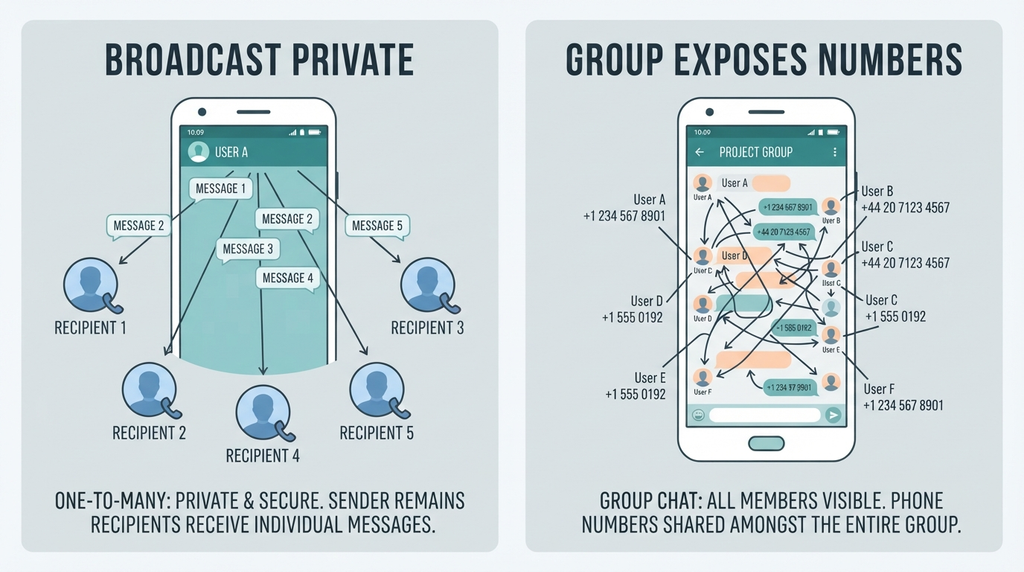
A broadcast list delivers your invitation to up to 256 contacts as individual private messages; replies come only to you.
Why It Works
A group chat exposes every member’s phone number to every other member and triggers reply-all chaos — the #1 WhatsApp wedding etiquette violation, and one that can’t be un-sent. A broadcast behaves like BCC: guests receive a personal message, numbers stay private, and the couple keeps a countable, orderly inbox instead of a 180-person group threaded through their planning season.
How to Do It
- Clean your contacts: dedupe, current numbers, country codes.
- WhatsApp → new broadcast list → add up to 256 recipients.
- Attach the card (send the video as a document if quality matters).
- Paste the message template (below) with the RSVP link as text so it’s tappable.
The Saved-Number Requirement (The Catch Nobody Warns You About)
Broadcasts deliver only to contacts who have YOUR number saved in their phone — WhatsApp’s anti-spam design. Guests without your number saved receive nothing, silently. The fix belongs earlier in the timeline: the save-the-date message (months before) includes “please save this number — the invitation comes from it.” It’s one sentence that prevents the classic “auntie never got the invite” mystery.
Strengths
- Complete number privacy
- Replies route to you alone — countable, not chaotic
- Free and native to the app everyone already uses
Trade-Offs
- 256-contact cap means multiple lists for big weddings
- The saved-number priming must happen in advance
Best For
Every invitation send. Groups are for the day-of logistics only.
#3. Collect RSVPs With a Form (Not Reply Threads)
A Google Form linked in the invitation message; responses land in a sortable Google Sheet.
Why It Works
“Reply to this message” produces 120 uncountable threads. A form produces a spreadsheet: names, attendance, guest counts, dietary needs, song requests — catering numbers at a glance, pivot-tableable, shareable with the planner. The form takes thirty minutes to build once and saves the couple the single worst admin job of wedding planning: chasing and counting replies by hand.
How to Do It
- Build the form: Name / Attending? / Number of guests / Dietary needs / Song request.
- Shorten and paste the link into the invitation message text.
- WhatsApp Business users: label chats (Yes / No / Pending) and set an away message pointing to the form.
Strengths
- Countable, exportable, shareable with planners
- Guests reply in 20 seconds
- Free
Trade-Offs
- Some guests will reply in chat anyway — transcribe to the sheet same-day
- Form-savvy varies by generation; phone the elders
Best For
Every wedding using WhatsApp invites.
Tools & Materials You’ll Need
Essential
- Canva account (free) or equivalent design app
- WhatsApp (or WhatsApp Business for labels/away messages)
- Google Forms + Google Sheets
Optional
- CapCut for video invites
- A short-link service for tidy form links
- Printed cards for non-WhatsApp relatives
The Content Checklist (Before Designing)
□ Names (formal or casual, matching the event) □ Date + start time (ADD TIME ZONE for international guests) □ Venue + Google Maps link □ Dress code □ RSVP deadline + form link □ Wedding website link, if any □ Contact number for questions □ Optional: gift note, parking/travel note, multi-event schedule
Copy-Paste Message Templates
The invitation message:
💌 [Names] are getting married! We’d love you with us on [Date] at [Time] [Time Zone] — [Venue] → [Maps link] Dress code: [X] 📋 Please RSVP by [Date]: [Form link] (Invitation attached 🎉)
The save-the-date message (sent months earlier):
Save the date! 💍 [Names] marry on [Date] in [City]. Formal invitation to follow — please save this number so it reaches you. 📲
The day-of group welcome:
Welcome to the [Surname] wedding group! 🎊 We’ll post timings, live location, and photo drops here. Please mute notifications if it gets chatty — see you on the big day!
The RSVP reminder (near the deadline, sent individually):
Hi [Name]! Just checking we have your RSVP for the wedding by [Date] — one minute here: [Form link]. Hope you can make it! 🤞
The Timeline (Six Months to Day-Of)
| When | Action |
|---|---|
| 6–9 months out | Save-the-date message (with the number-save request) — and the contact-list cleanup: current numbers, country codes, duplicates merged |
| 8 weeks out | Design finalized; broadcast lists built and cleaned |
| 6–8 weeks out | Invitation broadcast + form link |
| 2 weeks out | Gentle RSVP reminders to non-responders — individually, never a broadcast nag |
| 1 week out | Day-of group created (opt-in), key details pinned |
| Wedding day | Timings, live location, photo thread in the group |
Different Situations
International Guest Lists
Always include the time zone — a missing zone is the classic missed-flight maker. WhatsApp dominates across most of the world; for genuinely mixed-channel lists, send both formats (WhatsApp + SMS) from the same content.
Multi-Event Weddings (South Asian, Middle Eastern, multi-day celebrations)
One card per event, or a multi-panel design; broadcast once per event with clear event labels (Mehndi / Ceremony / Reception). The schedule block in the content checklist carries the master timeline.
Older Relatives
Print and mail cards for grandparents and non-users — or phone plus a mailed card. Dual-track is standard practice: WhatsApp carries the volume; print carries the keepsake tier.
The Day-Of Group (The One Legitimate Group)
Create it a week out, populate by invitation (people opt in), and pin the key message. It exists for logistics: timings, live location, transport notes, photo drops. Guests who want it, have it; guests who don’t, don’t.
Budget Reality
The whole system costs nothing but time. The print tier for thirty elders costs postage; the designer tier costs nothing if you stay in Canva. Total spend for most couples: under $50, against hundreds for full print runs.
Real-World Examples: Two Weddings, Sent
The 400-guest international wedding. A UK couple with families across three continents ran the full system: two broadcast lists (256 cap split by side), a multi-event card set for the Mehndi, ceremony, and reception, a Google Form feeding a planner-shared sheet, and a day-of group for the venue’s maze-like grounds (pinned: the live location). The RSVP counting ran itself; the only manual work was phoning a dozen elders — who each also received print. Their reported lesson: the contact cleanup mattered more than the design — the 90 minutes spent merging duplicates and fixing country codes before the send prevented every delivery failure before it existed. A UK couple with families across three continents ran the full system: two broadcast lists (256 cap split by side), a multi-event card set for the Mehndi, ceremony, and reception, a Google Form feeding a planner-shared sheet, and a day-of group for the venue’s maze-like grounds (pinned: the live location). The RSVP counting ran itself; the only manual work was phoning a dozen elders — who each also received print.
The 60-guest hometown wedding. A US couple used WhatsApp only for the international dozen and the day-of photo group, texting and mailing the rest. Their discovery: the broadcast lesson applies to any BCC-style send, and the form link worked identically in SMS. The system is channel-agnostic under the hood; WhatsApp is just its best carrier.
WhatsApp Business vs. Regular WhatsApp (Does the Couple Need the Business App?)
Regular WhatsApp covers the entire system above. WhatsApp Business adds three tools worth knowing about for engaged couples: labels (tag chats RSVP-Yes / RSVP-No / Pending and watch your count sort itself), an away message (auto-reply pointing to the RSVP form during the busiest planning weeks), and quick replies (saved templates for the reminders you’ll send twenty times). The account is free and uses your normal number. The one caution: switching mid-planning can confuse the broadcast setup — start on whichever app you’ll finish on, ideally before the save-the-date goes out.
Common Mistakes to Avoid
- Sending a group invite with all numbers visible — the privacy violation; broadcast exists for exactly this.
- RSVP instructions baked only into the image — “reply to this message” produces thread chaos; the form link goes in the message TEXT.
- Blind-sending the broadcast — delivery requires recipients to have your number saved; prime them with the save-the-date.
- Sending once at 7 a.m. — messages bury; the two-touch plan (invite + reminder near the deadline) is normal, not spammy.
- Heavy compression victims — send video invites as documents to preserve quality when it matters.
- No time zone on international lists.
- Treating the day-of group as another broadcast — the group needs consent; adding 180 people to a chatty group unasked undoes all the etiquette the broadcast built.
Troubleshooting
- “Some guests never got the invite.” The saved-number catch: they don’t have you saved. Message them individually (a normal chat delivers regardless) or re-send once they’ve added you.
- The card arrives blurry. Compression met a delicate design: re-export bolder, or send the image as a document too.
- The form link won’t tap. It got sent inside the image instead of the text, or it line-wrapped with a space — resend the link alone on its own line.
- Replies flood your chat despite the form. Label and transcribe same-day (WhatsApp Business labels were built for this); gentle re-pointing in each reply trains the list within a week.
- You hit the 256 cap. Split by guest side or alphabet; each list behaves identically, and nobody sees the difference.
Limitations and Trade-Offs
The 256-contact broadcast cap means manual re-sends for large weddings, and delivery depends on saved numbers — both manageable with the timeline above. WhatsApp offers no native RSVP tracking; the form is the system, and the form depends on guests’ willingness to tap a link. Digital invites lack the keepsake and formality that some families and some cultures require — the print tier isn’t optional for those guest lists, it’s the main event with WhatsApp as the utility layer. And US-domestic lists may find SMS simply more universal; the system transfers, the channel doesn’t.
Practical Checklist
One pre-flight habit that catches everything: send the entire invitation package to ONE trusted guest first — card, message text, form link — and have them confirm every element lands correctly. Five minutes with a friend is the cheapest QA in wedding planning.
□ Content checklist complete before design □ Card tested on your own phone at chat size □ Broadcast lists built (≤256 each); contacts deduped with country codes □ Save-the-date asked guests to save your number □ RSVP form live and linked in the message text (own line) □ Templates personalized; time zone included □ Send date set for 6–8 weeks out; reminder scheduled near the deadline □ Day-of group created with opt-in and a pinned message □ Print tier arranged for non-WhatsApp guests
Regional Notes
UK/Europe: WhatsApp is the default group messaging platform — the broadcast method fits naturally.
US: dual-track (SMS + WhatsApp) for mixed lists; WhatsApp for any international contingency.
India/South Asia, Middle East, Africa, Latin America: WhatsApp invitations are mainstream, including animated video invites; multi-event card sets are the norm, and envelope traditions coexist with the digital send.
Australia/NZ: WhatsApp groups for wedding-weekend logistics are common; the day-of group pattern applies.
Expert / Official Guidance
- WhatsApp Help Center: broadcast lists (256-contact limit, saved-number delivery requirement), sending documents, group privacy settings.
- The Emily Post Institute: digital invitation etiquette and timing windows (invites 6–8 weeks ahead).
Frequently Asked Questions
Image or video invitation?
Image for speed and universal delivery; video (20–30 seconds, photos + music) for the emotional wow. Best practice: video as the early tease, image card as the formal invite.
Can people just reply to RSVP?
They will anyway — reply warmly, transcribe into the sheet same-day, and let the form carry the countable majority.
How do I beat the 256 limit?
Multiple broadcast lists — split by guest side or alphabet; each list behaves identically.
Is a WhatsApp invitation acceptable for a formal wedding?
For the formality tier that expects engraving, WhatsApp works as the logistics layer alongside print. The etiquette consensus: the invitation’s formality should match the event’s register — digital-first for most modern weddings, print-led for black-tie and traditional family circles.
What about guests who never check WhatsApp?
The reminder tier catches them: one individual message near the RSVP deadline, then a phone call. The multi-channel truth holds everywhere — the couple who assumes one channel reaches everyone always has a mystery aunt.
How do I stop my number being visible to all guests?
The broadcast list — that’s its entire function. Your number IS visible to the guests you invite (they need it to reach you), but never to each other, which is the exposure that matters. For truly number-shy setups, some couples send from a dedicated “wedding” number used only for planning-season messages.
Final Takeaway
Build the card in Canva, send it by broadcast with the RSVP form linked in the message text, prime your number-savers with a save-the-date, and reserve groups for the day-of logistics people opt into. Print for the grandparents, include the time zone, and remind once before the deadline. That’s a complete digital invitation system for the price of an afternoon — and every guest’s number stays exactly where it belongs: with them.